The HDX system uses calibration sequences to analyze room acoustics and optimize audio performance. During calibration, the system emits a signal similar to static.
Calibration produces loud sounds for approximately 45 seconds. To avoid discomfort, consider covering your ears or using hearing protection. Ensure the room remains quiet throughout the process.
Install the full HDX system before powering it on and running calibration. If the system is powered on before installation is complete, it must be recalibrated afterward to ensure optimal audio quality. Recalibration is also required whenever components are added, removed, or repositioned. Calibration can be initiated using the Calibrate button on the system hub, or through Nureva Console or the Nureva App.
Initial calibration
When the HDX system’s components are connected and switched on for the first time, a calibration process will automatically start. This calibration has two stages.
Acoustic calibration: The first stage of the process (two long blasts of white noise) is used to understand the acoustics of the room and tune the echo canceler.
Geometric calibration: The second stage (two short blasts of white noise lasting 12 seconds) is new to the HDX system.
Autocalibration
Autocalibration is a continuous process and occurs while the HDX system is switched on. No user action is required to start or maintain the autocalibration process. The system usually takes a few minutes to gather sufficient calibration data and continues to fine-tune over time. This process does not affect the functionality and usability of the system. Autocalibration helps the HDX system understand changes to the room’s acoustics and ambient noise.
Fast calibration
Fast calibration is a process that calibrates the system within seconds. This process may be initiated manually through a remote control sequence or by using Nureva® Console. Fast calibration takes approximately 20 seconds to complete.
This option should be used when there are significant changes to the HDX system or room configuration. Make sure there are no audible sound sources in the room other than normal ambient noise (e.g., no music playing, no people talking).
It’s possible to start a fast calibration during a call. However, both parties will not be able to hear each other while a fast calibration is taking place. The microphones and speakers will be temporarily disconnected. The call will resume after fast calibration is complete.
Calibration button
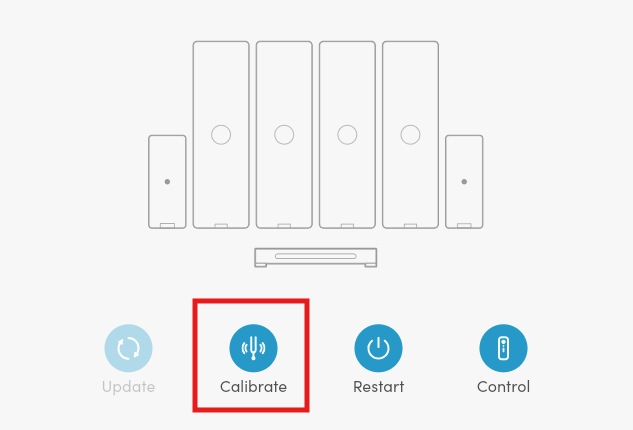
Calibration through the Nureva App
The following steps are required to perform calibration through the Nureva App:
From the main Home window, click on the Calibrate icon.
When the calibration signal stops and the status indicator lights return to a normal state, the calibration is complete.
Calibration through Nureva Console
The following steps are required to perform calibration through Nureva Console:
Select the device you wish to calibrate.
In the main Room overview window, click on the Calibrate icon.
When the calibration signal stops and the status indicator lights return to a normal state, the calibration is complete.
Note: When calibrating an HDX system, the status indicator lights on both microphone and speaker bars will alternate between solid red and solid blue. Pink noise will be heard from both microphone and speaker bars.