Nureva® HDL310 and HDL410 systems (device versions 3.1.396669 and later) support Network Time Protocol (NTP) over Dynamic Host Configuration Protocol (DHCP).
HDL310 and HDL410 systems use NTP to maintain accurate device time. By default, these systems synchronize with ntp.ubuntu.com.
With the 3.1.396669 update released in August 2026, the HDL310 and HDL410 systems can automatically obtain NTP server information from the network’s DHCP server.
When an NTP server is configured through DHCP, the system automatically uses that server instead of the default NTP source.
What’s changed
HDL310 and HDL410 systems now support NTP over DHCP.
If the DHCP server provides an NTP server, the system automatically uses that server for time synchronization.
The network check tool in Nureva Console and the Nureva App shows the NTP server currently being used by the system.
Check which NTP server a Nureva system is using
In Nureva Console or the Nureva App, open the Tools page.
Select Network check.
Under Network Time Protocol, find the address of the NTP server the system is using.
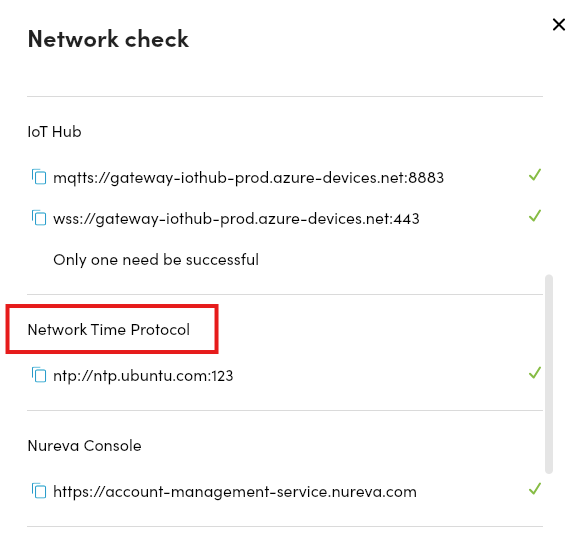
Note: If an NTP server is not provided by DHCP, the device continues to use the default server, ntp.ubuntu.com.